Key Takeaways
A polished video podcast is shaped before the cameras roll and refined through thoughtful post-production. The right podcast video editor can help turn one conversation into a consistent, useful brand asset.
- Plan the visual style, audio setup, and deliverables before recording.
- Edit for conversational pace without removing the personality of the speakers.
- Treat sound quality, captions, color, and framing as one connected experience.
- Repurpose strong moments into platform-specific social media clips.
- Choose an editor or production partner based on quality, communication, and fit.
What a podcast video editor does
A podcast video editor brings together the creative and technical decisions that turn a recorded conversation into a finished episode. That may include selecting camera angles, tightening the dialogue, mixing audio, adding graphics, and preparing several export sizes. The work is not simply about cutting footage; it is about preserving a natural exchange while making it easy to watch. A clear video podcast production guide can help teams think through that process before they begin.
How video podcast editing differs from audio editing
Audio editing asks the listener to stay with the conversation through sound alone. Video editing must also manage eye lines, reaction shots, camera changes, lighting differences, screen layouts, and moments when a speaker looks away or pauses. A good cut supports the meaning of the exchange rather than changing its tone. It should feel present and human, not overly polished to the point of losing spontaneity.
When to use a professional editor instead of DIY software
DIY software can work well when episodes are short, single-camera, and lightly produced. Professional help becomes more valuable when several cameras, remote guests, branded graphics, or frequent social clips are involved. The question is less about whether you can learn the software and more about whether editing every episode is the best use of your time. For teams comparing those tradeoffs, Descript is one example of an online tool with text-based video and multitrack podcast editing; a production partner is better suited when you need hands-on creative judgment across the whole workflow.
The production tasks an editor can handle
An editor can shape the episode from the first assembly to the final exports, while keeping the agreed visual language intact. Depending on the brief, that work may include:
- Syncing camera footage with separately recorded audio.
- Removing false starts, long pauses, repeated lines, and distracting interruptions.
- Balancing dialogue, music, room tone, and supporting sound.
- Adding captions, lower thirds, motion graphics, and platform-ready versions.
That division of labor gives the host more room to focus on preparation and conversation. VG Creations describes its Video Editing Services as covering basic cuts, color correction, audio mixing, motion graphics, subtitle creation, and multi-format exports, among other finished video deliverables.
How to plan a video podcast for efficient editing
Editing is easier when production decisions are intentional. Camera placement, microphone technique, file naming, and brand references all affect how quickly an editor can work and how consistent the finished episode feels. A short planning meeting can prevent hours of avoidable repair later. It also gives the conversation a visual shape before post-production begins.
Choosing camera angles, framing, and lighting
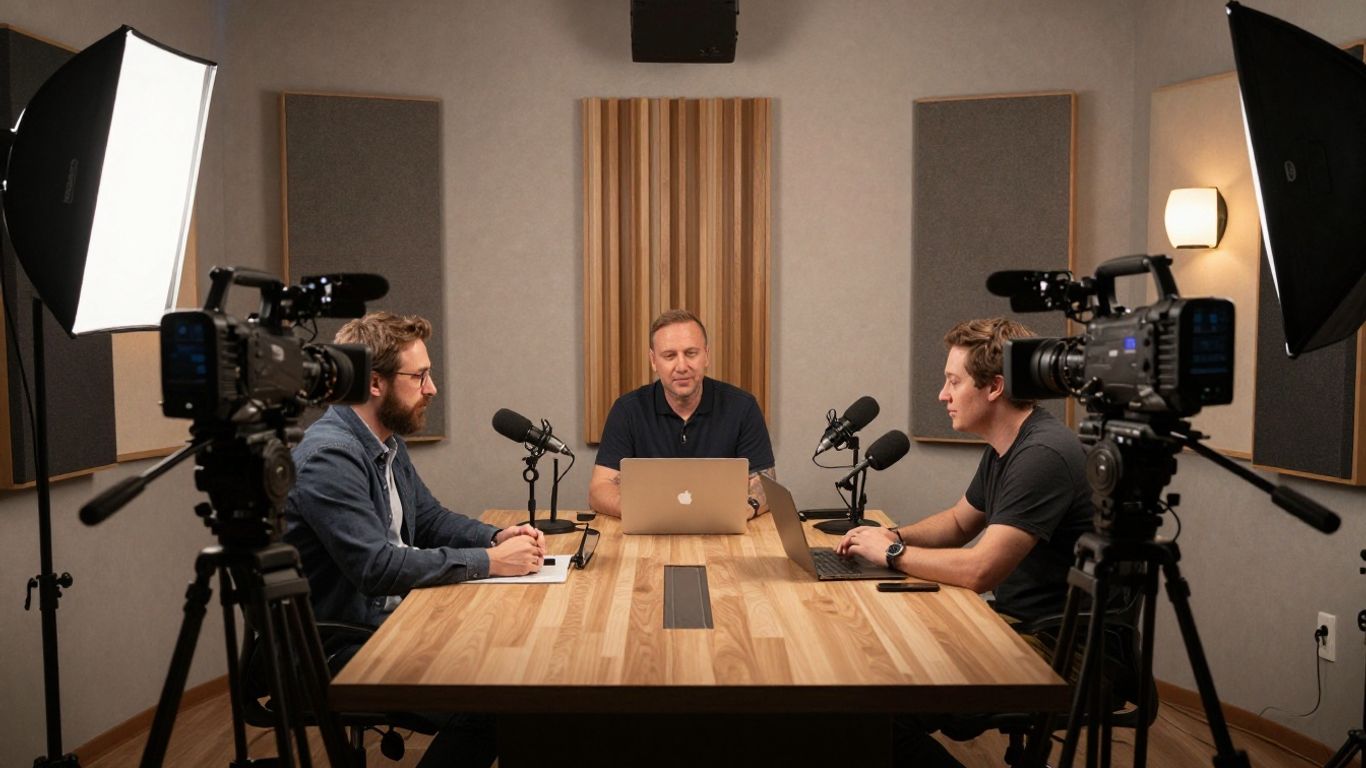
Start with a dependable primary angle for each speaker, then add a wider shot or an alternate angle if the conversation benefits from visual movement. Leave enough space around faces for captions and lower thirds, and check that backgrounds are not competing with the guests. Soft, consistent lighting is usually more useful than a dramatic setup that changes between shots. For more practical guidance, an Airbnb photography styling guide offers a useful reminder that decluttering, natural light, and intentional staging affect how polished a frame appears.
Recording clean audio for better post-production
The microphone should be treated as a central production decision, not an accessory added at the end. Record each voice clearly, monitor for clothing noise and room reflections, and capture a little room tone when possible. Consistent microphone distance makes mixing much easier, especially when guests turn their heads or lean back. Clean source audio gives the editor choices; poor source audio often forces compromises.
Creating a shot list and visual style before filming
A podcast does not need a complicated shot list, but it does need shared expectations. Decide which moments might call for a reaction shot, a tighter crop, a screen insert, or a supporting visual. Define the mood, color direction, intro length, caption treatment, and graphic style in a simple reference document. That document can also include the show’s brand voice guide, so the spoken tone and visual tone reinforce each other instead of pulling in different directions.
Organizing files, footage, and brand assets
A tidy handoff protects both the schedule and the quality of the edit. Use consistent names for camera cards, audio tracks, episode versions, logos, music, and graphics, then keep approved assets separate from experiments. Include notes about pronunciation, sensitive sections, required disclosures, and preferred spelling. Even administrative material has a place in the system: a Cookie Policy can be stored with other approved website and compliance documents when the episode links to a company site.
The core podcast video editing workflow
A reliable workflow usually moves from technical assembly toward creative refinement. First, the editor makes the material usable; then they shape the rhythm, improve clarity, and add the visual details that help the episode belong to the brand. Review is most productive when it happens at defined stages rather than through scattered changes. The result should be accurate, watchable, and ready for every agreed destination.
Syncing multi-camera footage and audio
The first assembly aligns the camera angles with the cleanest available audio. Matching waveforms, timecode, or a visible sync point can establish a dependable timeline, after which the editor checks drift and missing sections. Once the master sequence is stable, angle changes can be made for emphasis rather than to hide technical confusion. This is also the point to identify shots that are soft, obstructed, or inconsistent with the rest of the episode.
Removing pauses, mistakes, and distracting moments
The goal is not to erase every pause. Small breaths and natural thinking time can make a discussion feel authentic, while repeated phrases, false starts, long dead air, and avoidable interruptions can weaken momentum. Editors should listen for the intent behind an answer before tightening it. A respectful cut leaves speakers sounding thoughtful and present, not hurried.
Improving dialogue with noise reduction and audio mixing
Dialogue should remain intelligible on headphones, laptops, and phones without becoming harsh or unnaturally compressed. Noise reduction, equalization, compression, and level matching can help, but each adjustment should be judged against the original voice. Music and transitions need to support the conversation rather than cover it. Clear dialogue earns trust because viewers can concentrate on the ideas instead of fighting the sound.
A simple delivery check makes technical review less subjective. These checkpoints are useful before an episode moves to final approval:
- Listen through headphones and small speakers.
- Check that every speaker remains easy to understand.
- Watch for abrupt cuts, missing frames, and mismatched angles.
- Confirm captions, names, logos, and episode details.
The list is deliberately practical. A technically impressive sequence can still fail if a guest’s name is misspelled or a key answer disappears in the trim.
Adding transitions, captions, and supporting visuals
Transitions should clarify a change in topic, speaker, or location, rather than decorate every cut. Captions improve access and make silent viewing possible, while occasional photographs, screen recordings, or relevant B-roll can give the viewer a visual rest. Review every supporting asset for rights, accuracy, and brand fit. A final pass should confirm that graphics remain readable on both a full-size player and a small mobile screen.
A video podcast editing tutorial can be helpful for understanding the mechanics, but the strongest workflow still depends on editorial judgment. The conversation’s purpose should determine where the edit goes, not the availability of an effect.
How to make a video podcast look professional
Professional appearance comes from consistency more than extravagance. Similar exposure, restrained graphics, deliberate framing, and a repeatable opening make episodes feel like parts of one show. Viewers may not name each choice, but they notice when the choices conflict. The visual system should make the host and guest easier to follow.
Applying consistent color correction and cinematic grading
Color correction begins with exposure and white balance, especially when cameras or lighting sources differ. After the images match, a restrained grade can establish the atmosphere without making skin tones look unnatural. Save references from approved episodes and use them as a visual check for future sessions. Strong grading supports the story; it should not become the story.
Using branded intros, outros, and lower thirds
An intro can establish the show quickly, while an outro gives viewers a clear next step. Lower thirds should identify a speaker once, remain on screen long enough to read, and then get out of the way. Keep logos, type choices, animation speed, and sound cues consistent across episodes. VG Creations’ broader production offering includes podcast production from setup through post-production, an approach that makes these brand details part of the plan rather than a last-minute overlay.
Designing a clean layout for interviews and remote guests
Remote interviews need special care because guests may have different cameras, lighting, internet connections, and backgrounds. A split-screen layout can work when both frames are balanced, while a single-speaker layout may better support an important answer. Keep faces large enough to read and avoid filling the screen with decorative elements. Test the layout with captions enabled, since text changes the available visual space.
Maintaining visual consistency across episodes
Create a compact style sheet with approved colors, fonts, logo treatments, caption rules, transition behavior, and export specifications. Store it with the project assets and update it only through an agreed review process. This prevents an episode from drifting simply because a new editor or contractor joined the workflow. Consistency is a production habit, not a filter applied at the very end.
How to turn one episode into social media content
A full episode is only one expression of the conversation. Short clips can introduce the host’s point of view, answer a focused question, or create a reason to watch the longer discussion. Repurposing works best when clips are selected for their own small narrative rather than cut randomly from the timeline. A broader social media video strategy can help connect those clips to the brand’s wider publishing goals.
Selecting compelling clips and highlight moments
Look for a complete thought with a clear opening, useful tension, and a satisfying conclusion. Strong clips often contain a surprising opinion, a practical answer, a personal story, or a question the audience already asks. Start close to the point and remove setup that only made sense inside the full episode. Keep a note of the source timecode so revisions remain quick.
Formatting videos for YouTube, Instagram, TikTok, and LinkedIn
Each platform calls for a different viewing context, even when the underlying clip is the same. A horizontal episode may become a vertical close-up, a square quote-led cut, or a shorter professional insight. Reframe deliberately so faces, captions, and important objects stay visible. Prepare exports with platform dimensions, safe margins, and naming conventions agreed in advance.
Adding captions that improve mobile viewing
Captions should be accurate, well-timed, and easy to read without covering the speaker’s face. Break lines according to natural phrasing, use enough contrast against the background, and check names and technical terms manually. Captions also give editors a chance to emphasize a few words visually, but every emphasis should serve comprehension. Watch the finished clip muted before delivery to confirm it still makes sense.
Creating thumbnails and titles that encourage clicks
A thumbnail has one job: help the right viewer understand why the episode is worth opening. Use a recognizable face, a simple visual idea, and restrained wording rather than cramming in the entire topic. Titles should make a clear promise without exaggerating what the conversation contains. Test the thumbnail at a small size, where clutter becomes obvious.
How to choose the right podcast video editor
The right editor is not necessarily the person with the most effects in a portfolio. They should understand conversation, pacing, audience, brand requirements, and the practical limits of the source footage. For a business podcast, reliability matters as much as taste. A useful video editing services guide can provide a framework for assessing scope before requesting proposals.
Evaluating editing quality, communication, and turnaround time
Ask for a sample that shows dialogue editing, audio cleanup, camera selection, captions, and graphics in one coherent piece. Then ask how the editor receives notes, flags missing assets, and communicates schedule changes. Turnaround should be discussed as a complete cycle, including review and revisions, rather than only the first cut. The best arrangement is clear enough that both sides know what “finished” means.
Comparing in-house editors, freelancers, and production agencies
An in-house editor offers proximity to the team and may learn the brand deeply over time. A freelancer can provide flexibility for a defined volume of episodes, while an agency may bring production, editing, graphics, and social deliverables under one process. Compare the amount of coordination each option requires, not just the quoted editing fee. The practical choice depends on episode frequency, complexity, and how much strategy you need around the edit.
Reviewing portfolios for interviews and video podcasts
A portfolio should include work with real conversations, not only music-led montages. Look for clean multicamera cutting, natural pauses, consistent skin tones, intelligible audio, and graphics that do not overpower the speaker. Ask whether the examples show the editor’s role clearly. A polished reel can hide the parts of production that matter most to a long-form show.
Setting expectations for revisions, deliverables, and ownership
Before work begins, document the number of revision rounds, expected review windows, final formats, caption files, project files, thumbnail responsibilities, and music licensing. Confirm who owns the finished exports and source materials, and decide how archived episodes will be stored. If your show creates short clips, specify how many are included and which aspect ratios are required. Clear boundaries make creative collaboration calmer for everyone.
How professional podcast video production supports your brand
A podcast earns its place in a marketing plan when it does more than fill a publishing calendar. It can give an organization a steady way to explain expertise, introduce people, and develop a recognizable point of view. That value grows when episodes are planned as reusable assets rather than isolated uploads. The production process should connect the conversation to a real business purpose.
Aligning episodes with marketing and business goals
Begin with the audience’s questions and the action you want a useful episode to support. A show for prospective clients may prioritize education and trust, while an internal or event-focused series may emphasize access and community. Map topics to campaigns, sales conversations, recruiting needs, or authority-building goals. A brand video strategy guide can help teams connect production choices with audience, format, distribution, and measurable outcomes.
Using storytelling to build audience trust
Trust grows through specificity, consistency, and honest detail. Let guests explain how they solved a problem, what changed, and what they would do differently rather than reducing every answer to a slogan. Thoughtful editing can make that story easier to follow while leaving the speaker’s character intact. VG Creations positions its work around story-driven video strategy that helps businesses build trust, strengthen authority, and support measurable business results.
Measuring engagement, reach, and content performance
Choose metrics that reflect the job of the episode. Watch time and retention can reveal whether the conversation holds attention, while comments, shares, qualified inquiries, and clip performance show how the content travels beyond the original upload. Compare episodes against their own goals instead of chasing one universal benchmark. Over time, patterns can guide guest selection, topics, openings, and editing decisions.
Scaling a consistent production process for future episodes
Scaling does not mean making every episode identical. It means creating repeatable steps for planning, recording, editing, review, publishing, and repurposing so quality does not depend on memory. Use templates for folders, briefs, graphics, captions, approvals, and delivery notes. With a stable system, the team can spend more energy on the conversation itself and less on preventable production friction.
Conclusion
A polished video podcast begins with a clear purpose and ends with an experience that feels easy to watch, hear, and share. Thoughtful planning, careful editing, consistent design, and deliberate repurposing can turn a single conversation into a durable brand asset. Whether you build an internal workflow or work with a professional partner, the strongest results come from treating video as strategy rather than decoration.
Frequently Asked Questions
What does a podcast video editor do?
A podcast video editor assembles recorded footage and audio, shapes the conversation, improves sound, adds graphics and captions, and prepares the episode for its intended platforms.
How long does it take to edit a video podcast?
Timing depends on episode length, camera count, audio condition, graphics, captions, revision rounds, and the number of social clips required. A clear brief usually makes scheduling more accurate.
Should a podcast use multiple cameras?
Multiple cameras can add visual variety and help highlight reactions, but they also increase setup, storage, syncing, and editing needs. Use them when the additional angles serve the conversation.
What audio equipment is best for a video podcast?
Choose microphones that capture clear voices in the recording space, then monitor placement, room reflections, and clothing noise. Consistent microphone distance is often as important as the equipment itself.
How many social clips can come from one episode?
There is no fixed number. The useful total depends on how many complete, relevant thoughts the episode contains and whether each clip can stand on its own for its intended audience.
What should be included in a video podcast brief?
Include the audience, goal, episode format, visual references, graphics, caption requirements, deliverables, deadlines, review process, and ownership of final and source files.
Is it worth hiring a professional podcast video editor?
Professional help can be worthwhile when editing takes time away from higher-value work or when the show requires multicamera assembly, strong audio mixing, branded graphics, captions, and dependable recurring delivery.
